- Published on
How to Set Per-Team LLM Budgets That Actually Hold
By Subramanyan Balakrishnan · Chief Executive Officer · LinkedIn
Setting a budget for AI usage sounds simple until the first team hits it mid-month. A budget that is only reported after the fact does not control anything, and one that is too tight pushes people to personal accounts. This guide walks through setting per-team LLM budgets that stay in force without choking adoption.
The method in one line: measure real usage first, set limits a little above it, enforce them at the gateway, decide in advance what happens at the cap, and review monthly.
Why budgets belong at the gateway
A budget can live in three places: a spreadsheet, a provider dashboard, or the gateway. Only the gateway can stop a request before it reaches the provider. A spreadsheet tells you what already happened, and a provider-level cap usually applies to a whole key, not to a team. Enforcing at the gateway means a limit is a limit, which is the point we make in AI Cost Optimization: The Complete Guide.
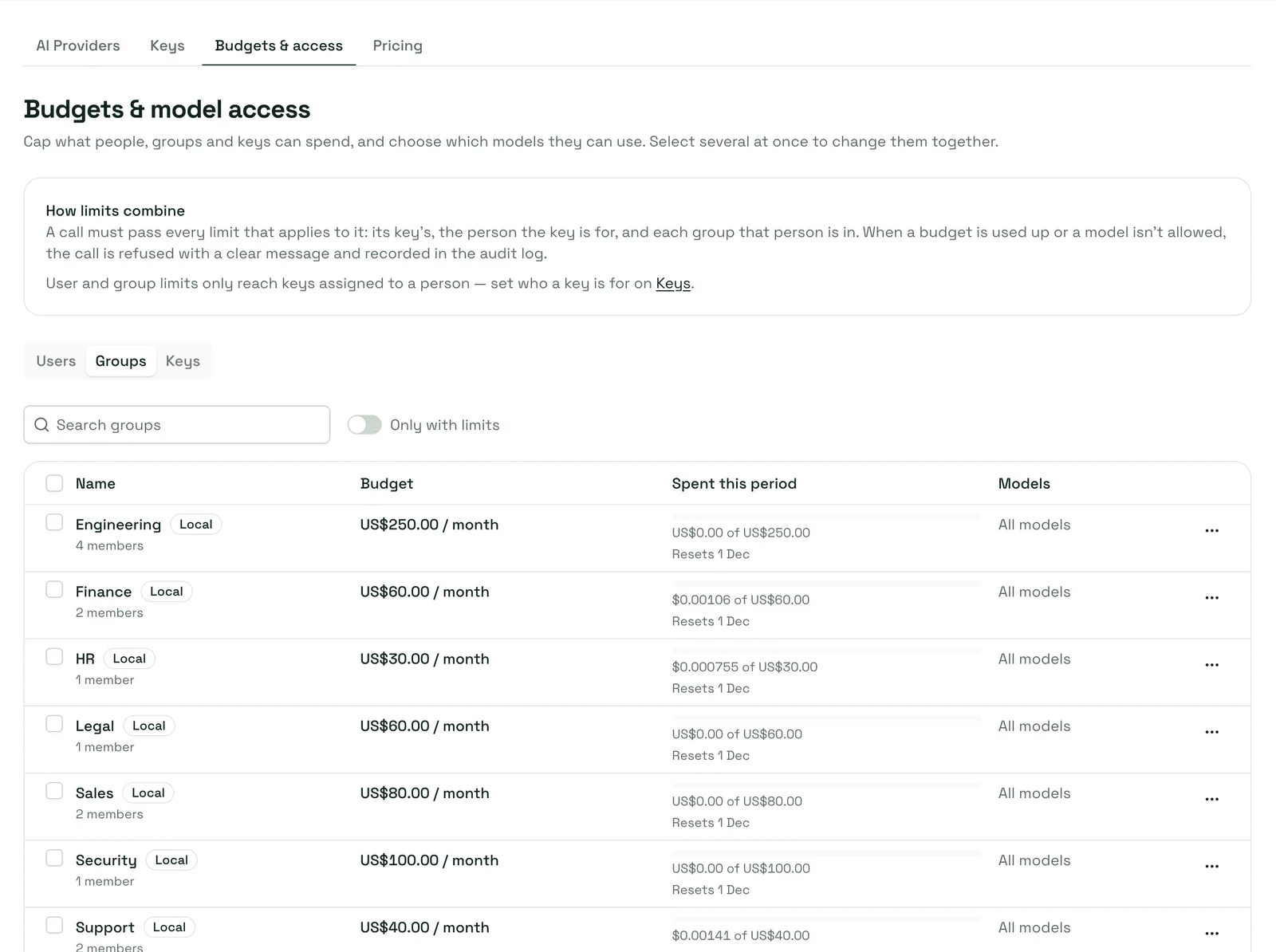
Monthly budgets per group, and the models each group can use, in the SecuriX admin console. A call has to pass every limit that applies to it, and a refusal is recorded in the audit log.
Step 1: Get a baseline
Before setting anything, find out what is being spent and by whom. Pull invoices and provider usage reports, list seat contracts and any API keys, and note any expensed personal subscriptions. If you do not have attribution yet, a week or two of traffic through a gateway gives you real numbers by team, user and model. A budget set without a baseline is a guess.
Step 2: Define teams the way your organization already does
Use your identity provider's groups, so budgets follow departments automatically as people join, move and leave. If group membership is provisioned through SCIM, there is nothing to maintain by hand. Avoid inventing a separate team structure just for AI; it will drift out of date.
Step 3: Choose the unit
You can budget in currency or in tokens, or both.
- Currency is what finance cares about and is easy to compare across models.
- Tokens are easier for teams to reason about and avoid surprises when a model's price changes.
A common approach is a currency budget per team, with token or rate limits per user to catch runaway usage.
Step 4: Set initial limits from real usage, with headroom
Start from observed usage rather than a target. A reasonable first pass is to take what a team actually used in the baseline period and add headroom so ordinary growth does not trigger the cap. As an illustration with made-up numbers: if a support team used the equivalent of $6,000 in a month, a starting budget somewhere above that gives them room, and you revisit it after a month of real data.
In the first weeks, optimize for adoption, not restriction. Generous limits that you tighten with data work better than tight limits that you loosen after complaints.
Step 5: Use soft limits and hard limits together
- A soft limit (for example at 80 percent of budget) notifies the team and its owner while there is still room to adjust.
- A hard limit blocks or changes behaviour at 100 percent.
Soft limits are how you avoid surprises, and hard limits are how you avoid overages.
Step 6: Decide what happens at the cap
Do this before anyone hits it. The main options:
- Block further requests until the budget resets or is raised.
- Downgrade the team to a cheaper model, so work continues at lower cost.
- Require approval to raise the limit.
For most knowledge-work teams, downgrading is the least disruptive. For batch jobs and experiments, blocking is usually correct, because that is where runaway loops come from.
Step 7: Add per-user limits and anomaly alerts
Team budgets stop a team overspending, but they do not stop one user or script from consuming most of it in an hour. Per-user rate limits and alerts for unusual spikes, repeated identical prompts or off-hours usage catch problems in minutes rather than at the end of the month.
Step 8: Review monthly and attribute
Look at spend by team, by model and by user once a month. Raise budgets where usage is healthy, investigate where it is not, and share the numbers with team leads so spend becomes self-regulating. Attribution also makes internal chargeback possible, if you want it.
Common mistakes
- Setting limits without a baseline, then relaxing them under pressure.
- Using monitoring as enforcement. Alerts without a hard limit do not prevent overages.
- Cutting access instead of cost. Rationing AI pushes people to unsanctioned tools. Cheaper access is the goal.
- Forgetting API keys and agents. Service accounts and automations need budgets too.
- Never revisiting. Models, prices and usage change.
Budgets and the break-even point
If you are still deciding between per-seat licences and pay-per-token access, the budget you set depends on that choice. See Per-Seat vs Pay-Per-Token for how to find your break-even point, or try the AI cost calculator.
Where SecuriX fits
SecuriX enforces monthly budgets per team at the gateway, issues scoped virtual keys with rate limits, can move a capped team to a cheaper model, and raises anomaly alerts, with every request attributed to an SSO identity. See the LLM gateway page for the full list, and What Is an LLM Gateway if you are new to the idea.
Frequently asked questions
Should budgets be in dollars or tokens? Dollars for finance, tokens for engineers. Many teams use a dollar budget per team with token or rate limits per user.
What is a sensible soft limit? Around 80 percent of budget is a common starting point, so the team has time to react.
What should happen when a team hits its limit? Decide in advance. Downgrading to a cheaper model is usually less disruptive than blocking, except for batch jobs.
How often should we revisit budgets? Monthly at first, then quarterly once usage is stable.
Why caps matter before a pricing change: The 151st Seat: Claude's Enterprise Pricing Cliff.
Model budgets for your own teams
Bring your headcount and teams and we will show how budgets and enforcement would look in SecuriX.
See SecuriX in front of your own traffic.
Tell us where to reach you and we'll set up a walkthrough with your identity provider, your policies, and your budget structure.